Start with structure.
Create projects and cost plans from your company’s templates, or copy an existing plan within a project. Add cost items with rates and quantities.
“Create a fit-out project from our office template.”
 Request a Demo

Connect your AI assistant to CostrixIQ or utilise the inbuilt AI capabilities. Explore your project numbers, prepare cost plans and carry out supported actions through a conversation.
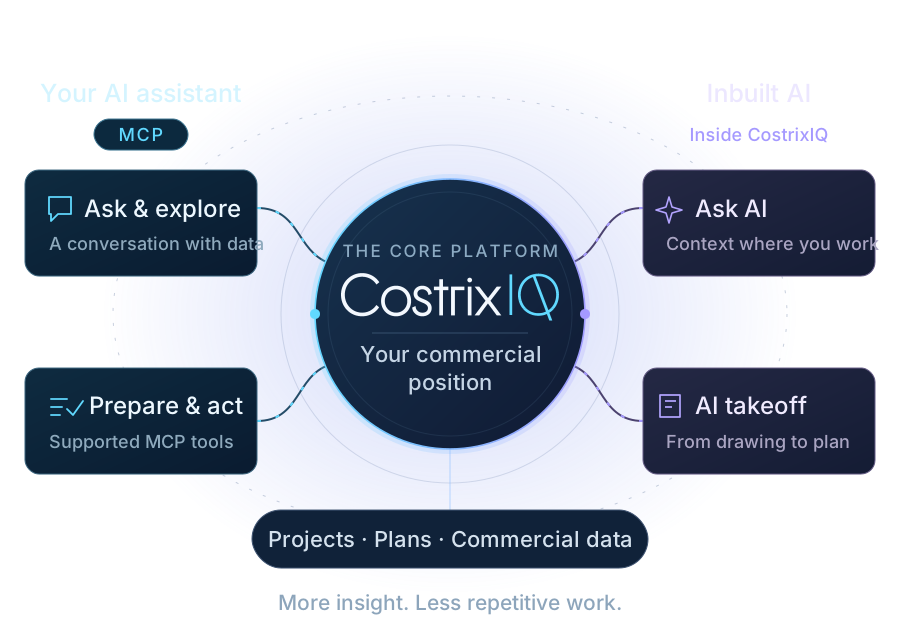
Connected through MCP
Model Context Protocol (MCP) gives a compatible AI assistant a structured way to work with CostrixIQ. Bring the conversation to the projects, plans and commercial information your team already uses.
Create projects and cost plans from your company’s templates, or copy an existing plan within a project. Add cost items with rates and quantities.
Update supported cost-item fields, declared margins, discounts and cost recoveries. Take a snapshot to record the commercial position.
Ask strategic and complex questions about your projects and cost plans. Connect the detail across cost, sell, margin and budget coverage to understand what is driving the position and where to focus next.
Connected to CostrixIQ, through a compatible assistant. Available actions depend on your connection and permissions.
Your expertise, enhanced
Bring a coach, mentor and advisor into the work your team is already doing. Explore questions, test assumptions and work through decisions using your own projects, cost plans and commercial data.
Coach
Challenge assumptions, examine gaps and prepare for the next commercial conversation with your project numbers in view.
“What assumptions should we challenge before submitting this cost plan?”
Mentor
Explore the reasoning behind the numbers. Help your team understand commercial movements and develop their judgement through the work in front of them.
“Help me understand why our margin changed between these two plan revisions.”
Advisor
Compare options, understand trade-offs and identify where to focus attention before deciding what to do next.
“Which changes could strengthen this project’s margin, and what trade-offs would they involve?”
AI adds perspective, connects the detail and helps your team build on its experience, all grounded in your own commercial data.
The next chapter
One direction brings guidance and support into your everyday workflow. The other helps turn drawings into quantities your team can review and use.
A built-in coach, mentor and advisor, grounded in the screen you are on and your own commercial data.
Understand the screen, project and information you are working with.
Ask questions, explore options and build understanding with a coach, mentor and advisor.
Bring relevant help into the conversation and work through the next step.
Carry the conversation and relevant context into a support request.

AI assistance for the repeated work between a drawing and the cost plan.
Upload your drawings and allow AI to identify and track changes between revisions.
Identify drawing elements and prepare suggested measurements and quantities for review.
Check what was found, resolve gaps and confirm the quantities.
Link the reviewed quantities to cost items and continue the commercial work.
Working with AI
No. The MCP connection allows a compatible external AI assistant to work with supported CostrixIQ tools. There is no fee to connect via MCP, and token usage is managed through your external AI subscription.
Built-in CostrixAI will be an add-on module with its own token allowance for use within CostrixIQ.
The connector includes supported actions for creating and updating records. Access depends on the signed-in user and connection permissions. Review the intended action and its result as part of your normal commercial process.
Yes. Each tenancy can train CostrixAI using its own data, drawings and takeoffs, helping it learn how your team works. Over time, this supports greater automation tailored to your processes.
The MCP connection is now live and fully functional, allowing a compatible external AI assistant to work with supported CostrixIQ tools. Built-in CostrixAI is coming soon.
See the Intelligence